Xmodgames 1.2.1 for android is not working on some Samsung devices at present. If your Samsung device cannot use XMG 1.2.1,please check “SE for Android status” in Setting > About Device. In “Enforcing” mode, the mod CANNOT be loaded(ONLY happens on android 5.0 and above), while in “Permissive” mode, the mod is working. We haven’t solved the “Enforcing” mode issue at present, but we will try our best. And we’ve collected some solutions for changing the SE from “Enforcing” to “Permissive”, which are for reference only. Really sorry for the inconvenience caused.
Update(New method or running xmod on Samsung arrived Check it out)
As we already discussed about Latest Xmodgames Working in Android lollipop 5.0
Important: The following solutions are collected from our Xmodgames users, which are for reference only. Be carefully, any misoperation may brick your device.
Solution 1 (by Mario Bernardini)(for Samung Galaxy S5)
A guide on how to install a package that will change the kernel of your device Glaxy s5 samsung android 5.0. This amendment will allow xmodgames working.
A guide on how to install a package that will change the kernel of your device Glaxy s5 samsung android 5.0. This amendment will allow xmodgames working.
1.Download Odin from below link
Download Ondin from here
Download Ondin from here
2.After installing odin you will have to download another file that will serve to simplify the BIOS interface of the device:
Downlaod Philz recory
2.once downloaded you will go on your PC and it will install via Odin.
Download the custom kernel of Samsung s5 from below link :
3.After installing philz_touch,
4.turn off your device after turning it off turn it on again while holding the key with which you increase the volume button + Home + Power,
5.install zip,That you downloaded from above link, arter97-kernel. after installing the files you should restart the device, after turning on the phone re install xmodgames.
Solution 2 (by Emin Orbay)(solution for Note 3)
Hello Everyone, Now i will explain you how to make xmod work on official samsung touchwiz lollipop 5.0. I have samsung galaxy note 3 N9005 model with touchwiz lollipop 5.0. This method is works for me. Hope i can help you.
First we have to remove mods from xmod. After remove mods remove xmod from phone also.
Later we have to permissive SE for Android Status. Its now Enforcing.
Now only way is custom kernel. Here link for Note 3 lollipop.
For other samsung models you have to find yourself.
Here is a link for samsumg note 3.
Download custom kernel for note3
Later we have to permissive SE for Android Status. Its now Enforcing.
Now only way is custom kernel. Here link for Note 3 lollipop.
For other samsung models you have to find yourself.
Here is a link for samsumg note 3.
Download custom kernel for note3
Download it and flash via CWM or TWRP. After Flash done wipe caches. And reboot phone. After reboot you should Turinred text on boot.Like on photo
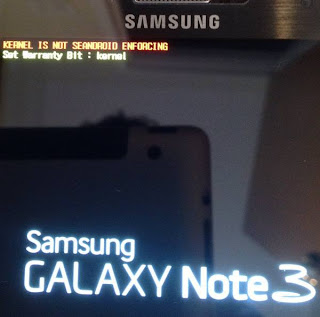
After phone open check settings / about device now it should looks permissive like on photo. If you still you don’t see permissive try download SELinux Mode Changer from play store. After you got permissive text. You can install xmod and mods. And booom its working.
Solution 3 (by Rizki Mubarok)(For i9500)
Change enforcing to permissive on i9500.
credit to my friend on kaskus community who helping me.and al-iraqi created this kernel
After Doing the above steps visit
Download Xmodgames Working in Android lollipop 5.0
Don’t forget, only use the kernel recommend for your phone model. If you use other model kernel. You may brick your phone.I am not responsible for any damage to you phone..
hello, i have a note 3, i have permissive in selinux, i have lean kernel and the mod doesn´t work
Did you remove mods and uninstall the xmod firstly before changing the .if you did them did you download the latest xmod on your note 3 .
Will it work on note 4 sm-910g indian model?? I will update my note 4 only if xmod works with it. Plz help me
It is not tested in note 4 yet and you need to find a kernel for not 4 by yourown self and you can give a try and do a feedback about it.If it works it will be great…
Sorry but we did not try on it.You need to find a kernel for note 4 by your self and I think you should give it a try and give us you feedback
What kind of kernel do i need to flash in note 4 ?
Use that kerenal that can change your selinux to permissive
It all worked out in the galaxy s5 5.0, thank you!
Thx for your reply. By the way, I have found a kernel for note 4 SM -910G which has selinux permissive but I am not sure whether it would work perfectly on the abovesaid device on android 5.0.1. I am posting the link of the same, please have a look at it and plz help.
http://forum.xda-developers.com/note-4/orig-development/tw-kernel-emotroid-team-t2990557
Yes you can give try on it and if works all well then enjoy other wise do a search for new kernal !
I tried on my SM-910C, using Adam kernel (http://forum.xda-developers.com/note-4/orig-development/kernel-adam-kernel-t2945323) and now my SELinux is permissive.
However, COC still not working.
precession did everything worked more my galaxy s5 android 5.0 this running very same without moving it
Does it work with Galaxy S5 version SM-G900F ?
Hi!
You need to find a kernal for your version as I am not sure that this kernal works or not .
Hi!
You need to find a kernal for your version as I am not sure that this kernal works or not .
I returned to the kit kat who do not need the kernel
Good idea !
I tried the above kernel(the xda link which i posted above), it does change my selinux mode to permissive but i am not able to receive mobile network signal(It says please insert sim card, sim is already inserted).So the above kernel which I mentioned cant be used with indian note 4 SM-N910G(BASEBAND VERSION-N910GDD1BOC1) AND (BUILD NUMBER-LRX22C.N910GDTU1BOC6) because we wont be able to receive mobile network in india, but you can use the above kernel for international variant (sm-n910f) so you can add that model in your post as well. But please can you help me with my phn. I am not able to get any kernel so far which supports selinux permissive and in which we can get the mobile network as well. Please help. I dont want to downgrade to kitkat as battery backup and UI is improved vastly, no stutterings or lags in touchwiz now. Thx
Firstly thanx for you valuables feedback and I I find some thing that you can try on you note 4
FIX SE LINUX ENFORCING ISSUE WITHOUT FLASHING CUSTOM KERNEL FOR SAMSUNG GALAXY PHONES!!!
[Guide 3.0]
Method
1.) Clear Data of Xmod Games…..{settings/applications_manger/xmod}
2.) http://goo.gl/m2K4Zf …Download, install, run…..{fixes permission issues}
3.) http://bit.ly/1aaUDI1 … Download, install, run…use it to CONVERT xmod to SYSTEM (click tools then "Move to system/app"), not to SD but to SYSTEM
4.) Reboot, Lauch xmod and grant root, install mods and success!
5.) If stil not working go to "settings/application_manager/all/xmod"…clear data,and reboot.
It WILL work. Message me if you need help!
Thx mate, will try this tomorrow and will give you the feedback, thx a lot again. ?
Bro it did not work, I tried the above steps, but when i open coc with xmod after installing the mod, x sign appears on the right , when i click it, it says
Oops! mod doesn't work now
Please try the following 4 steps:
1.Root your device successfully.
2.Update the game and mod to the newest version.
3.Reboot your device and the game.
4.Any question, contact us:
[email protected].
I tried this on xmod v1.2.1, do i need to upgrade xmod to the latest before installing xmod for coc ? If yes then, how? when i go in xmod and then go to about and click on check for update, it says it is already the latest version, please help.I was using xxassistant when i was on kitkat, Thx
As this xmod is already the latest version and as the method above mentioned is not worked for you then you have to wait for new version to release till then keep visiting and for running xmod you can switch to k.k 😀
http://www.gammerson.com/2015/04/videohow-to-run-xmodgames-on-samsung.html new method is here check it out
Samsung Galaxy Note 3 SM-N9005
Xmod Version 1.2.1
Xmod Version 1.2.0
Rom : AryaMod 5.2
Kernel : Artel Kernel – Xmod UI will pop up but cant activate sandbox, etch
Kernel : Civz Xplorer – Xmod UI will pop up but cant activate sandbox, etch
http://www.gammerson.com/2015/04/videohow-to-run-xmodgames-on-samsung.html see this new method
I have same problem with my note 4 910s. Other way to help me? I'm a new for android system. Thanks
http://www.gammerson.com/2015/04/videohow-to-run-xmodgames-on-samsung.html check this
Comment:what should i do for the gionee p3s….u dont have said anything about gionee does xmode work on gionee….i have my gionee with lollipop 5.1 android version